Experience Design
Cross-industry
Enterprise UX Design: Why Complex Products Need More Than Simple Interfaces
Published on October 15, 2026

table of content
- Introduction
- Enterprise UX design starts with the work, not the interface
- A four-part Clarient framework for better enterprise UX design
- Enterprise UX design is not about making everything simpler
- When complexity starts costing the business
- Conclusion: The goal is not a simpler product. It is easier work.
listen to blog
summary
Discover how enterprise UX design makes complex products easier to navigate, reduces friction, & helps teams get more value from enterprise software.
Introduction
You have a product that does exactly what the business needs. It brings together complex workflows, multiple user roles, detailed data, business rules, approvals, and exceptions. Yet the people using it still struggle to find the right information, complete routine tasks, or know what to do next.
So where does the problem actually lie? Is the product too complex? Or has the complexity simply not been designed around the way people work?
That is the question at the heart of enterprise UX design.
At Clarient, we have worked with complex digital products where removing functionality was never the answer. The challenge was to understand the work behind the interface, organize the complexity around real user needs, and help people move through it with less friction.
So instead of asking, How do we make this product simpler?, we ask: How do we make complex work easier to understand, navigate, and complete?
Let's break it down.
Enterprise UX design starts with the work, not the interface
Complexity comes with enterprise software. A claims platform may need to accommodate hundreds of data points, while permissions in a healthcare system can vary considerably depending on who is using it. Financial platforms have their own requirements around controls, approvals, and audit trails. Much of this is necessary for the product to do its job.
Where things become difficult is when all of that complexity is passed on to the user. People may need access to a lot of information, but they rarely need all of it at once. The experience should help them see what is relevant to the work in front of them, without making the rest difficult to find when they need it.
Complexity the business needs | Complication the user doesn't |
Multiple roles | Everyone sees the same information |
Detailed data | Everything appears at once |
Business rules | Users have to remember the rules |
Complex workflows | Too many disconnected steps |
Exceptions | No clear recovery path |
Powerful functionality | Features are difficult to discover |
Gartner's 2025 research on enterprise software points to enhanced user experience, contextual decision augmentation, and outcome orchestration as areas technology leaders should prioritize.
The shift is simple, don't ask, “How do we simplify the product?” Rather, focus on how to simplify the work.
A four-part Clarient framework for better enterprise UX design
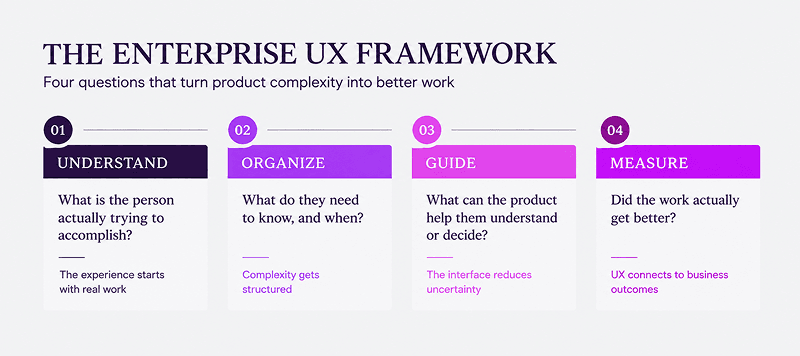
At Clarient, we think about complex product experiences through four questions:
Understand → Organize → Guide → Measure
Together, they form a practical way to move from complexity to clarity.
1. Understand the work
Start here, not with the dashboard, navigation, or feature list.
Look beyond the screen
An enterprise product rarely supports one simple task. A claims platform might require someone to review a case, validate information, check policy rules, request documentation, and make a decision. An HCM platform might take a manager from identifying a performance issue to documenting it, getting approval, and tracking what happens next.
If you design only the screens, you can easily optimize each interaction while making the overall job harder.
Understand the work around the product
Look at who is doing the work, what they are responsible for, what decisions they need to make, and what information they rely on. More importantly, understand what happens before and after they use the product.
This is where UX research can make a real difference. When you watch people do their work, you start seeing things that a requirements document might miss. Maybe they keep a spreadsheet open next to the product. Maybe they handle approvals over email. Maybe they keep copying information from one system to another. Or maybe they have found their own workaround because the product does not quite work the way they need it to.
McKinsey found that only about half of the companies in its study conducted user research before developing their first design ideas or specifications. More than 40 percent were not talking to end users during development.
At Clarient, this is why we look beyond what people say they want from a product. We look at the work itself: where decisions happen, where time is lost, where information gets fragmented, and where people create workarounds.
2. Organize the complexity
Once you understand what people are trying to get done, the next question is simple: what do they actually need to see, and when?
A good experience does not try to show everything at once. It helps people get to the right information at the right moment, without making them work through things that are not relevant to them.
Design around different contexts
Not everyone comes to a product looking for the same thing.
An analyst might want to dig into transaction details. A manager might only need to see what needs approval or where something has gone wrong. An administrator may be focused on keeping the system configured and running smoothly.
Giving everyone the same screen does not make the experience more powerful. It simply makes people spend more time sorting through things that do not matter to them.
Instead, shape the experience around what each person is trying to get done. That does not mean building a different product for every role. It means making the right information, actions, and context easier to find when people need them.
Reveal complexity when it becomes useful
People should not have to deal with advanced options before they need them.
Progressive disclosure can keep more complex controls available without putting them in everyone's way. A clear hierarchy can help people quickly see what needs their attention and what can wait. Role-aware experiences can bring forward the information and actions that matter to each person's responsibilities.
The same applies to supporting information. If someone needs context to make a decision, bring it into the moment rather than making them hunt for it somewhere else.
Create consistency across the product
This is where an enterprise design system becomes more than a collection of reusable components.
A mature system gives teams shared patterns for navigation, hierarchy, interaction, accessibility, and behavior. That means people do not have to relearn how the product works every time they move to a new screen.
Gartner's 2025 research on design systems highlights their role in reducing reinvention and supporting consistency as digital products scale.
The goal is not to hide complexity or remove it altogether. It is to give people the depth they need without making them carry all of it at once.
3. Guide the user
Once complexity is organized, the interface has another job: helping people move through it.
Design for decisions, not just actions
Enterprise users are often making decisions, not simply completing clicks.
They may need to understand why a request was rejected, determine which information is missing, compare two records, approve an exception, or recover from an error without losing the work they have already done.
A well-designed experience makes those moments explicit.
Make the next step clear
The interface should preserve the context of the task, make the next meaningful action visible, explain what changed and why, and show the status of work that may take hours or days to complete. When something goes wrong, it should tell people what happened and what they can do about it.
Without that guidance, the interface quietly transfers the work to the user.
Remember where you came from, what you changed, figure out why the status changed, work out what happens next, and find the information you need somewhere else.
Those are not just usability issues. They are additional cognitive and operational costs built into the workflow.
Reduce unnecessary mental work
The best UX for enterprise applications does not try to eliminate every decision or automate every step. It reduces the unnecessary mental work around the decisions that people actually need to make.
This becomes even more important as enterprise software becomes more adaptive. Gartner's 2025 research on adaptive experiences points toward interfaces that can respond to context, behavior, preferences, and environmental signals.
Designing for AI-assisted work
AI is becoming a bigger part of how people get work done. Copilots can summarize information, agents can take care of tasks, and automated systems can suggest what to do next or even make decisions.
That changes how we think about designing complex products. Instead of guiding people through every step, the experience also needs to help them understand what AI is doing, when to trust it, and when they need to step in.
Users are no longer only asking, “Where do I find this?” They also need to understand what the AI did, why it did it, and when they need to step in.
Make AI actions understandable
When AI recommends an action or changes something on a user's behalf, give people enough context to understand what happened. Show relevant sources, explain the basis of a recommendation, and make it clear when an action was generated by AI.
Keep people in control
Not every AI action needs the same level of oversight. A generated summary is different from a financial approval. For high-stakes decisions, users should be able to review, edit, approve, reject, or question an AI-generated result before it takes effect.
Design for recovery
AI will sometimes get things wrong. The experience should make it easy to see what changed, undo an action, correct an output, or try again.
This is why AI fits naturally into the guide stage. Whether the next step comes from a person or an AI system, the experience should reduce uncertainty and keep people oriented throughout the work.
4. Measure the work
Did the experience actually make the work better? A redesigned interface can look dramatically better and still fail the people using it. The more useful questions are:
| Measure | What it tells you |
| Task completion | Can people actually finish the job? |
| Time to complete | How much effort does the workflow require? |
| Errors | Where does the experience break down? |
| Adoption | Are people using the capabilities you invested in? |
| Workarounds | Are they still relying on spreadsheets, email, or manual processes? |
This is where design becomes a business discipline rather than a visual exercise.
McKinsey's five-year study of 300 public companies found that organizations in the top quartile of its Design Index had 32 percentage points higher revenue growth and 56 percentage points higher total shareholder return than industry counterparts. The study also found that more than half of surveyed companies lacked objective ways to assess or set targets for design performance.
Enterprise UX design is not about making everything simpler
When an enterprise product feels difficult to use, the instinct is often to simplify it. Remove a field. Collapse a menu. Reduce the number of screens. Hide advanced functionality. Sometimes that is exactly right. But enterprise products are complex for a reason. That complexity often reflects the work itself.
Simplify the decision, not necessarily the product
The better question is not how much can we remove? It is, what does this person need to understand or act on right now?
A dense table may be appropriate if it helps an analyst compare information quickly. A complex configuration panel may be appropriate if it gives an administrator the control they need. A long workflow may be necessary if it reflects regulatory or operational requirements.
The UX problem begins when people have to process complexity that has nothing to do with the task in front of them.
Give people complexity in context
This is where enterprise UX vs consumer UX becomes an important distinction. Consumer products often optimize for immediacy and ease of entry. Enterprise products frequently need to support expertise, precision, multiple roles, detailed information, and decisions with real operational consequences.
A useful test for every feature
Before removing or simplifying something, ask three questions: Who needs this? When do they need it? What decision or action does it support?
If the answer is unclear, the feature may need a rethink. If it is clear, the next question is how to make that capability easier to find, understand, and use.
Design an Enterprise Experience That Works the Way Your People Work.
When complexity starts costing the business
Complexity becomes a business problem when people start finding their own ways around the product. They create spreadsheets because they cannot get the view they need. They move information between tools because the systems do not work well together. They ask colleagues for help because they are not sure what to do next. They skip certain features because learning how to use them feels like more work than it is worth.
Look for friction in the critical path
Not every problem needs to be fixed right away. Start with the things people do most often, the tasks that matter most to the business, and the steps where mistakes can cause real problems.
Ask: Where are people spending too much time? Where do small mistakes create bigger issues? Where do they leave the product to finish the job? Where do they need to ask someone else for help? And where has a new feature made an existing task harder than it used to be?
These questions help separate cosmetic UX issues from problems that are affecting how the business operates.
Connect UX problems to business outcomes
At Clarient, this is why we do not treat a complex product as a UI problem alone. The underlying issue might be the information architecture, workflow design, product strategy, data structure, or a technical limitation. A visual redesign cannot solve a workflow that is fundamentally broken.
This is also why enterprise software design works best when design, product, data, and engineering work from the same understanding of the user's job.
The same principle should shape validation. Usability testing should go beyond asking whether people like a screen. Put users through meaningful tasks and observe where they hesitate, what they misunderstand, what they skip, where they make errors, and what they do when the system does not behave as expected.
The takeaway for product teams
Before investing in another interface refresh, look at what people are doing around the product.
If they are building workarounds, asking for help, moving between systems, or avoiding important capabilities, you may not have a visual design problem. You may have a work problem disguised as a UX problem. Find that problem first. Then design around it.
Conclusion: The goal is not a simpler product. It is easier work.
Complexity is not going away. Enterprise products will continue to support multiple roles, complicated workflows, large amounts of information, regulatory requirements, integrations, and exceptions. The goal is not to remove all of that. It is to make sure people can work through it without having to carry the complexity themselves.
That is where better enterprise UX can make a real difference. When people can find what they need, understand what matters, know what to do next, and get their work done without having to find their own workarounds, everything starts to feel a little easier. The product becomes easier to use, and the business becomes easier to run.
At Clarient, we start by looking at the work behind the product. We understand how people actually use it, where they get stuck, and where the experience makes simple things harder than they need to be. From research and workflow design to product experience and validation, we bring people, processes, data, and technology together to make complex products feel easier to work with every day.
If your product is powerful but your users are still working around it, let’s change that.
Talk to Clarient about creating an enterprise experience that is easier to use, easier to scale, and built around the way your people actually work.
Frequently Asked Questions
Enterprise applications are difficult to use when the complexity of the business is transferred directly to the person using the product. Multiple roles, permissions, data sources, business rules, integrations, and exceptions can create an experience that feels difficult even when every feature serves a legitimate purpose.
Good enterprise ux design separates necessary complexity from unnecessary friction. It gives people the information, controls, and context they need for the task at hand without asking them to understand the entire system at once.
Start by understanding the complete journey rather than optimizing individual screens. Workflow mapping can reveal unnecessary steps, repeated actions, handoffs, missing information, and points where users lose context.
From there, structure the experience around clear tasks, meaningful information hierarchy, contextual guidance, and predictable next steps. The goal is not necessarily fewer steps. It is fewer moments where people have to stop and figure out what the system expects them to do.
Neither in isolation. Enterprise interfaces need to balance simplicity with the functionality people genuinely need to perform their work.
The distinction between enterprise ux vs. consumer ux is useful here. Consumer experiences can often optimize heavily for immediacy and simplicity, while enterprise products may need depth, precision, and information density. The better question is: How can the product provide the required functionality without making users carry unnecessary complexity?
Design around roles, goals, permissions, and levels of expertise. A single application can provide different views, workflows, information priorities, and controls while maintaining a consistent underlying experience. A well-structured enterprise design system can help maintain consistency as these experiences scale.
Test the work, not just the interface. Key areas include task completion, navigation, comprehension, errors, recovery, accessibility, role-specific workflows, and performance under realistic conditions.
Usability testing should involve representative users performing meaningful tasks in realistic contexts. It should reveal where people hesitate, make mistakes, create workarounds, or fail to complete the job.
Start by understanding why people are not adopting it. The issue may be poor discoverability, inefficient workflows, inadequate training, lack of role-specific relevance, or a product that does not fit how work actually happens.
Strong enterprise software design connects user needs with business processes and technology constraints. Better adoption usually follows when the product makes important work easier, faster, and more predictable.
Look for evidence that the partner can work beyond visual interface design. Strong enterprise ux research should connect user behavior to workflows, product strategy, technology, and measurable business outcomes.
For complex products, the right partner should be able to move from understanding the problem to designing, validating, and improving the experience across the product lifecycle.
UX for enterprise applications has to account for complex workflows, multiple roles, large information sets, permissions, integrations, and business-critical tasks. Success is therefore measured not only by whether an interface feels intuitive, but by whether people can reliably complete meaningful work.
Weekly Insights Subscription
Stay ahead with Clarient insignts on customer insights
Share
Written by

Parthsarathy Sharma
With 4+ years of experience across AI, UX, enterprise technology, and brand strategy, Parthsarathy brings a research-driven lens to digital experience content. His work focuses on turning emerging technology, customer experience, and business trends into clear, practical perspectives for readers.
Reviewed by

Khushi Arora
Khushi is a UX Designer working on AI-powered enterprise SaaS products. Her work spans end-to-end product design, UX research, and designing intuitive experiences for complex, multi-persona systems — from compliance platforms to AI-driven tools. Through her writing, she shares practical perspectives on UX design, product thinking, and building user-centered enterprise software.